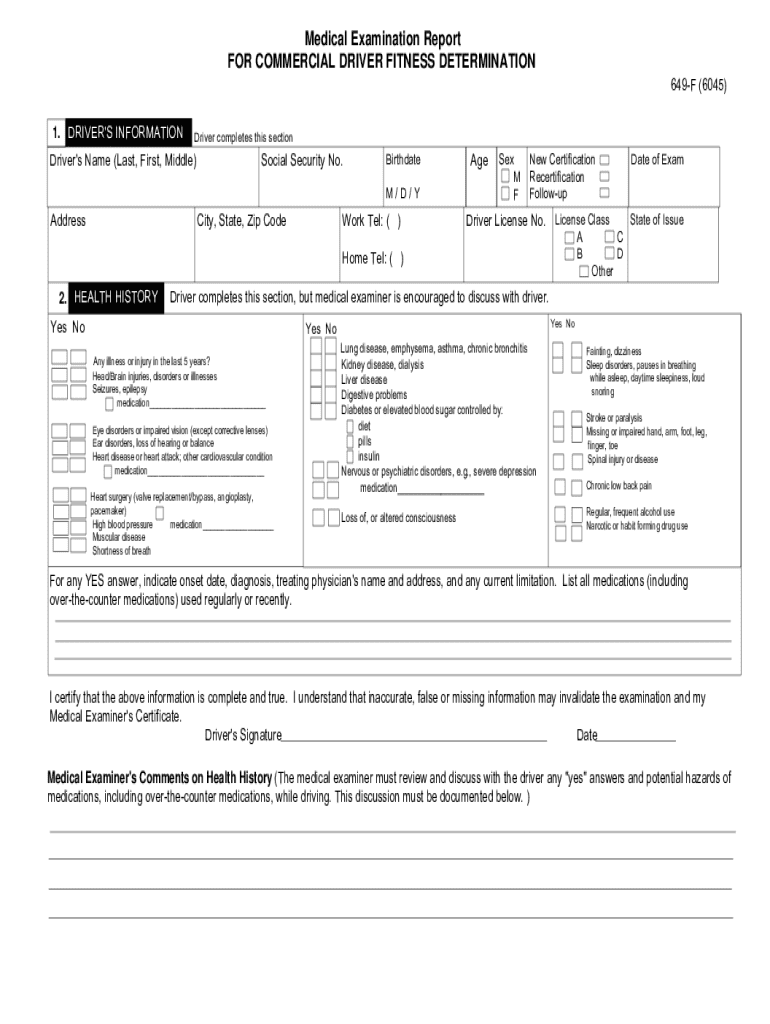
Dot Physical Form


What is the Dot Physical Form
The Dot Physical Form, also known as the DOT medical examination report form, is a crucial document required for commercial drivers in the United States. This form ensures that drivers meet the health standards set by the Department of Transportation (DOT) to operate commercial vehicles safely. It is typically completed by a certified medical examiner and includes information about the driver's medical history, physical examination results, and any necessary recommendations for treatment or restrictions.
Steps to Complete the Dot Physical Form
Completing the Dot Physical Form involves several important steps to ensure accuracy and compliance with DOT regulations:
- Gather necessary documents: Collect your medical history, including any medications and previous medical conditions.
- Visit a certified medical examiner: Schedule an appointment with a medical examiner listed on the National Registry of Certified Medical Examiners.
- Undergo a physical examination: The examiner will assess your overall health, including vision, hearing, and cardiovascular health.
- Complete the form: The examiner will fill out the Dot Physical Form based on the examination results and your medical history.
- Receive your medical certificate: If you meet the required standards, you will receive a medical certificate valid for up to two years.
Legal Use of the Dot Physical Form
The legal use of the Dot Physical Form is essential for compliance with federal regulations governing commercial driving. The form must be completed accurately and submitted to employers or state agencies as required. It serves as proof that the driver has undergone a medical examination and meets the necessary health standards. Failing to complete this form or submitting inaccurate information can lead to penalties, including fines and disqualification from operating commercial vehicles.
How to Obtain the Dot Physical Form
Obtaining the Dot Physical Form is a straightforward process. The form is typically provided by the medical examiner during your physical examination. However, it is also available for download from the official DOT website or other reputable sources. Ensure you are using the most current version of the form to avoid any compliance issues.
Key Elements of the Dot Physical Form
The Dot Physical Form contains several key elements that are essential for assessing a driver's fitness to operate a commercial vehicle:
- Driver's personal information: Name, address, date of birth, and driver's license number.
- Medical history: Details about previous medical conditions, surgeries, and medications.
- Physical examination results: Findings related to vision, hearing, blood pressure, and overall health.
- Recommendations: Any restrictions or follow-up actions required based on the examination results.
Form Submission Methods
Once the Dot Physical Form is completed, it can be submitted through various methods, depending on the requirements of your employer or state agency. Common submission methods include:
- In-person: Handing the completed form directly to your employer or designated agency.
- Mail: Sending the form via postal service to the appropriate address.
- Online: Some employers may allow electronic submission through secure online portals.
Quick guide on how to complete dot medical form
Discover the simplest method to complete and endorse your Dot Physical Form
Are you still inefficiently investing time in preparing your official paperwork on hard copies instead of handling it online? airSlate SignNow presents a superior approach to finalize and authenticate your Dot Physical Form along with similar forms for public administration. Our intelligent electronic signature solution equips you with all the tools required to manage documents swiftly and in conformity with official standards - robust PDF editing, organizing, securing, signing, and sharing features readily available within an intuitive interface.
Only a few actions are necessary to finalize and endorse your Dot Physical Form:
- Upload the fillable template to the editor using the Get Form button.
- Ascertain what details you must include in your Dot Physical Form.
- Navigate through the fields with the Next option to avoid omitting anything.
- Utilize Text, Check, and Cross tools to fill in the fields with your information.
- Revise the content with Text boxes or Images available in the upper toolbar.
- Emphasize what is truly signNow or Obscure sections that are no longer relevant.
- Select Sign to create a legally valid electronic signature with any method you prefer.
- Add the Date beside your signature and complete your task by clicking the Done button.
Store your completed Dot Physical Form in the Documents section of your profile, download it, or transfer it to your preferred cloud storage. Our solution also supports versatile form sharing. There is no requirement to print your templates when submitting them to the appropriate public office - accomplish this via email, fax, or by requesting a USPS "snail mail" delivery from your account. Try it out now!
Create this form in 5 minutes or less
FAQs
-
How was your experience of medical exam after IES interview?
Well, our (ESE 2014 Batch) medical examination was conducted after the interview and before the declaration of the final result. The medical centers were allocated based on the permanent address mentioned in DAF. Before 2014, they used to conduct medical examination after the declaration of the final result. There is no difference between them, just different timings and it is conducted only once. My ESE interview was on 22nd January 2015, and after the interview got over I was thinking of hanging out with some friends there for some days but after a day or two we all got a mail mentioning the dates and venues of our medical examination. It was quite frustrating and surprising for us. Mine was scheduled on 2nd Feb, 2015 at Central Hospital, Maligaon, Guwahati. So I had to book tickets soon (obviously tatkal), came from Delhi to Kolkata and then headed for Guwahati. I signNowed Maligaon on 2nd Feb at 2am. It was quite chilly outside. I was too tired to move, was sleepy too. I could not see any means of transportation outside the station at that time. So I kept on waiting at the station and at last there it was, a rickshaw. I told him to take me to a nearby hotel and he acknowledged so by nodding. He took me to a hotel, yes it was closed at that time, called them, no one picked up. Then another, no vacant bed. Then another, same story. I told him to leave (he already did more than what was he asked to) when I found some policemen there on the roadside and decided to ask them for help. I told them my purpose of visit. They were quite cooperative and helped me find a decent hotel nearby the Central Hospital. So it was almost 5am when I signNowed the hotel and I dozed off instantly. Could not sleep more though, had to wake up soon enough as the reporting time was 9am. Woke up, freshened up, drank a lot of water ( just to make sure urine test goes well :D ) and had some light breakfast. I took a huge water bottle with me and headed for the hospital. signNowed the hospital at 8.46 am (yes, that was the exact time ) and saw some of the candidates were already there at the hospital premises. Some came alone, some came with their parents. We 9 were present there for medical examination that day. Slowly we started interacting with one another and were discussing what might gonna happen in the medical test in a light mood. Little did we know that the administration was gonna give us a hard time. Sometime later we figured out that medical examination was never scheduled at Maligaon Central Hospital before. That was the first time and as a result the concerned administration was quite messy and inefficient. We kept on waiting, lunch time was over and they were still busy with the paper work and all. Time was 4pm, still nothing. We all got angry, agitated, frustrated to the core and approached the medical officer there. He seemed least bothered about the delay. And the first two words out of his mouth, just dumbfounded us. "Come tomorrow". Like seriously? We had booked our respective train/flight return tickets for the same day. Who'd compensate for that? After a short discussion we decided to call the railway board and told them about the whole scenario. The response from the railway board was quite satisfying, they understood our problem and gave us assurance of prompt action. And yes! It did work. It was 4.40 pm and the medical officer came to us and assured that the medical examination would happen that day itself. So after all those hassles and infinite waiting period our medical examination started at 5pm. What a sigh of relief! We filled up some forms and completed the necessary paperwork. First test was x-ray. It was over in a jiffy. 2nd test was urine test (disgusting and dirty bathroom, felt like vomiting). 3rd test was physical fitness test(height, weight(tip: underweight people stuff yourself with enough food and water ;) :) , chest expansion, BP and all) . 4th was ENT test. Then last and the most important, the Eye Test which was quite exhaustive. And it all got over by 7pm. Just a few phone calls to the railway board made all that possible. So after our medical examination got over, the medical officer called us to his office and apologized to all of us for the inconvenience. He also assured us his further assistance in case we needed any. So we left the hospital at around 7.30pm after completing the final paperwork and leaving our contact for further communication. Yes it was quite a long day for all of us!P.S: 5 out of 9 candidates were in the final list of ESE-2014 :)
-
Do military members have to pay any fee for leave or fiancee forms?
NOOOOOOO. You are talking to a military romance scammer. I received an email from the US Army that directly answers your question that is pasted below please keep reading.I believe you are the victim of a military Romance Scam whereas the person you are talking to is a foreign national posing as an American Soldier claiming to be stationed overseas on a peacekeeping mission. That's the key to the scam they always claim to be on a peacekeeping mission.Part of their scam is saying that they have no access to their money that their mission is highly dangerous.If your boyfriend girlfriend/future husband/wife is asking you to do the following or has exhibited this behavior, it is a most likely a scam:Moves to private messaging site immediately after meeting you on Facebook or SnapChat or Instagram or some dating or social media site. Often times they delete the site you met them on right after they asked you to move to a more private messaging siteProfesses love to you very quickly & seems to quote poems and song lyrics along with using their own sort of broken language, as they profess their love and devotion quickly. They also showed concern for your health and love for your family.Promises marriage as soon as he/she gets to state for leave that they asked you to pay for.They Requests money (wire transfers) and Amazon, iTune ,Verizon, etc gift cards, for medicine, religious practices, and leaves to come home, internet access, complete job assignments, help sick friend, get him out of trouble, or anything that sounds fishy.The military does provide all the soldier needs including food medical Care and transportation for leave. Trust me, I lived it, you are probably being scammed. I am just trying to show you examples that you are most likely being connned.Below is an email response I received after I sent an inquiry to the US government when I discovered I was scammed. I received this wonderful response back with lots of useful links on how to find and report your scammer. And how to learn more about Romance Scams.Right now you can also copy the picture he gave you and do a google image search and you will hopefully see the pictures of the real person he is impersonating. this doesn't always work and take some digging. if you find the real person you can direct message them and alert them that their image is being used for scamming.Good Luck to you and I'm sorry this may be happening to you. please continue reading the government response I received below it's very informative. You have contacted an email that is monitored by the U.S. Army Criminal Investigation Command. Unfortunately, this is a common concern. We assure you there is never any reason to send money to anyone claiming to be a Soldier online. If you have only spoken with this person online, it is likely they are not a U.S. Soldier at all. If this is a suspected imposter social media profile, we urge you to report it to that platform as soon as possible. Please continue reading for more resources and answers to other frequently asked questions: How to report an imposter Facebook profile: Caution-https://www.facebook.com/help/16... < Caution-https://www.facebook.com/help/16... > Answers to frequently asked questions: - Soldiers and their loved ones are not charged money so that the Soldier can go on leave. - Soldiers are not charged money for secure communications or leave. - Soldiers do not need permission to get married. - Soldiers emails are in this format: john.doe.mil@mail.mil < Caution-mailto: john.doe.mil@mail.mil > anything ending in .us or .com is not an official email account. - Soldiers have medical insurance, which pays for their medical costs when treated at civilian health care facilities worldwide – family and friends do not need to pay their medical expenses. - Military aircraft are not used to transport Privately Owned Vehicles. - Army financial offices are not used to help Soldiers buy or sell items of any kind. - Soldiers deployed to Combat Zones do not need to solicit money from the public to feed or house themselves or their troops. - Deployed Soldiers do not find large unclaimed sums of money and need your help to get that money out of the country. Anyone who tells you one of the above-listed conditions/circumstances is true is likely posing as a Soldier and trying to steal money from you. We would urge you to immediately cease all contact with this individual. For more information on avoiding online scams and to report this crime, please see the following sites and articles: This article may help clarify some of the tricks social media scammers try to use to take advantage of people: Caution-https://www.army.mil/article/61432/< Caution-https://www.army.mil/article/61432/> CID advises vigilance against 'romance scams,' scammers impersonating Soldiers Caution-https://www.army.mil/article/180749 < Caution-https://www.army.mil/article/180749 > FBI Internet Crime Complaint Center: Caution-http://www.ic3.gov/default.aspx< Caution-http://www.ic3.gov/default.aspx> U.S. Army investigators warn public against romance scams: Caution-https://www.army.mil/article/130...< Caution-https://www.army.mil/article/130...> DOD warns troops, families to be cybercrime smart -Caution-http://www.army.mil/article/1450...< Caution-http://www.army.mil/article/1450...> Use caution with social networking Caution-https://www.army.mil/article/146...< Caution-https://www.army.mil/article/146...> Please see our frequently asked questions section under scams and legal issues. Caution-http://www.army.mil/faq/ < Caution-http://www.army.mil/faq/ > or visit Caution-http://www.cid.army.mil/ < Caution-http://www.cid.army.mil/ >. The challenge with most scams is determining if an individual is a legitimate member of the US Army. Based on the Privacy Act of 1974, we cannot provide this information. If concerned about a scam you may contact the Better Business Bureau (if it involves a solicitation for money), or local law enforcement. If you're involved in a Facebook or dating site scam, you are free to contact us direct; (571) 305-4056. If you have a social security number, you can find information about Soldiers online at Caution-https://www.dmdc.osd.mil/appj/sc... < Caution-https://www.dmdc.osd.mil/appj/sc... > . While this is a free search, it does not help you locate a retiree, but it can tell you if the Soldier is active duty or not. If more information is needed such as current duty station or location, you can contact the Commander Soldier's Records Data Center (SRDC) by phone or mail and they will help you locate individuals on active duty only, not retirees. There is a fee of $3.50 for businesses to use this service. The check or money order must be made out to the U.S. Treasury. It is not refundable. The address is: Commander Soldier's Records Data Center (SRDC) 8899 East 56th Street Indianapolis, IN 46249-5301 Phone: 1-866-771-6357 In addition, it is not possible to remove social networking site profiles without legitimate proof of identity theft or a scam. If you suspect fraud on this site, take a screenshot of any advances for money or impersonations and report the account on the social networking platform immediately. Please submit all information you have on this incident to Caution-www.ic3.gov < Caution-http://www.ic3.gov > (FBI website, Internet Criminal Complaint Center), immediately stop contact with the scammer (you are potentially providing them more information which can be used to scam you), and learn how to protect yourself against these scams at Caution-http://www.ftc.gov < Caution-http://www.ftc.gov > (Federal Trade Commission's website)
-
How can I fill out Google's intern host matching form to optimize my chances of receiving a match?
I was selected for a summer internship 2016.I tried to be very open while filling the preference form: I choose many products as my favorite products and I said I'm open about the team I want to join.I even was very open in the location and start date to get host matching interviews (I negotiated the start date in the interview until both me and my host were happy.) You could ask your recruiter to review your form (there are very cool and could help you a lot since they have a bigger experience).Do a search on the potential team.Before the interviews, try to find smart question that you are going to ask for the potential host (do a search on the team to find nice and deep questions to impress your host). Prepare well your resume.You are very likely not going to get algorithm/data structure questions like in the first round. It's going to be just some friendly chat if you are lucky. If your potential team is working on something like machine learning, expect that they are going to ask you questions about machine learning, courses related to machine learning you have and relevant experience (projects, internship). Of course you have to study that before the interview. Take as long time as you need if you feel rusty. It takes some time to get ready for the host matching (it's less than the technical interview) but it's worth it of course.
-
How do I fill out the form of DU CIC? I couldn't find the link to fill out the form.
Just register on the admission portal and during registration you will get an option for the entrance based course. Just register there. There is no separate form for DU CIC.
-
How do you know if you need to fill out a 1099 form?
Assuming that you are talking about 1099-MISC. Note that there are other 1099s.check this post - Form 1099 MISC Rules & RegulationsQuick answer - A Form 1099 MISC must be filed for each person to whom payment is made of:$600 or more for services performed for a trade or business by people not treated as employees;Rent or prizes and awards that are not for service ($600 or more) and royalties ($10 or more);any fishing boat proceeds,gross proceeds of $600, or more paid to an attorney during the year, orWithheld any federal income tax under the backup withholding rules regardless of the amount of the payment, etc.
Create this form in 5 minutes!
How to create an eSignature for the dot medical form
How to make an electronic signature for your Dot Medical Form online
How to make an electronic signature for the Dot Medical Form in Google Chrome
How to generate an eSignature for putting it on the Dot Medical Form in Gmail
How to generate an eSignature for the Dot Medical Form right from your mobile device
How to make an eSignature for the Dot Medical Form on iOS devices
How to create an electronic signature for the Dot Medical Form on Android devices
People also ask
-
What is a DOT Physical Form and why is it important?
The DOT Physical Form is a mandatory document used to verify that commercial drivers meet the health standards set by the Department of Transportation. It is crucial for ensuring that drivers are physically capable of safely operating commercial vehicles, thereby promoting road safety. Completing this form is essential for compliance with federal regulations.
-
How can I fill out a DOT Physical Form using airSlate SignNow?
With airSlate SignNow, you can easily fill out a DOT Physical Form online. Our platform allows you to upload the form, add your information, and eSign it securely, streamlining the entire process. This ensures you can complete your DOT physical paperwork quickly and efficiently.
-
What features does airSlate SignNow offer for managing DOT Physical Forms?
airSlate SignNow offers features such as customizable templates, secure eSignature capabilities, and document tracking for managing DOT Physical Forms. You can automate workflows, set reminders for renewals, and ensure compliance effortlessly with our user-friendly interface. This makes handling DOT Physical Forms both efficient and reliable.
-
Is there a cost associated with using airSlate SignNow for DOT Physical Forms?
Yes, airSlate SignNow offers various pricing plans to accommodate different business needs. While the cost may vary based on the features you choose, using SignNow for your DOT Physical Forms can save you time and resources in the long run. Check our pricing page for detailed information on plans and features.
-
Can I integrate airSlate SignNow with other applications for DOT Physical Forms?
Absolutely! airSlate SignNow seamlessly integrates with a variety of applications such as Google Drive, Dropbox, and CRM systems. This integration allows you to manage your DOT Physical Forms more efficiently, ensuring that all your documents are easily accessible and organized.
-
What are the benefits of using airSlate SignNow for DOT Physical Forms?
Using airSlate SignNow for DOT Physical Forms provides signNow benefits, including increased efficiency, enhanced security, and improved compliance with regulations. Our platform allows for quick eSigning and easy document management, ensuring that your DOT Physical Forms are processed without delays.
-
How secure is my information when using airSlate SignNow for DOT Physical Forms?
Security is a top priority at airSlate SignNow. We use advanced encryption and secure cloud storage to protect your information when handling DOT Physical Forms. With our compliance with industry standards, you can trust that your sensitive data remains safe and confidential.
Get more for Dot Physical Form
- 221g document submission email form
- Ies r form
- Unit rates and ratios of fractions matching worksheet answers form
- Body sugaring intake form nwa skin care solutions
- Seatle dci form permit transfer electrical sign seatle dci form permit transfer electricalsign
- Naugatuck ct current items for bid form
- Doti permit 103 1 block parties on residential streets form
- Mndot mto request to sublet form 9 16 docx
Find out other Dot Physical Form
- How To Integrate Sign in Banking
- How To Use Sign in Banking
- Help Me With Use Sign in Banking
- Can I Use Sign in Banking
- How Do I Install Sign in Banking
- How To Add Sign in Banking
- How Do I Add Sign in Banking
- How Can I Add Sign in Banking
- Can I Add Sign in Banking
- Help Me With Set Up Sign in Government
- How To Integrate eSign in Banking
- How To Use eSign in Banking
- How To Install eSign in Banking
- How To Add eSign in Banking
- How To Set Up eSign in Banking
- How To Save eSign in Banking
- How To Implement eSign in Banking
- How To Set Up eSign in Construction
- How To Integrate eSign in Doctors
- How To Use eSign in Doctors